Manage Contact Information
Alternate Addresses
There are many reason a family record may have multiple addresses. Under the Mailing Label field where addresses are stored, the number in parenthesis designates how many addresses are attached to the family record. Individuals may also have their own alternate addresses. For example, you might still want a college student listed with their parents but, their school year mailing address should list their campus location.
Effective dates are important for alternate addresses to list correctly. To list this as a primary address for a family or individual, enter effective dates. When producing mailing labels, the Date of Mailing field on Step 2 determines which address should be prioritized.
Add an Alternate Family Address
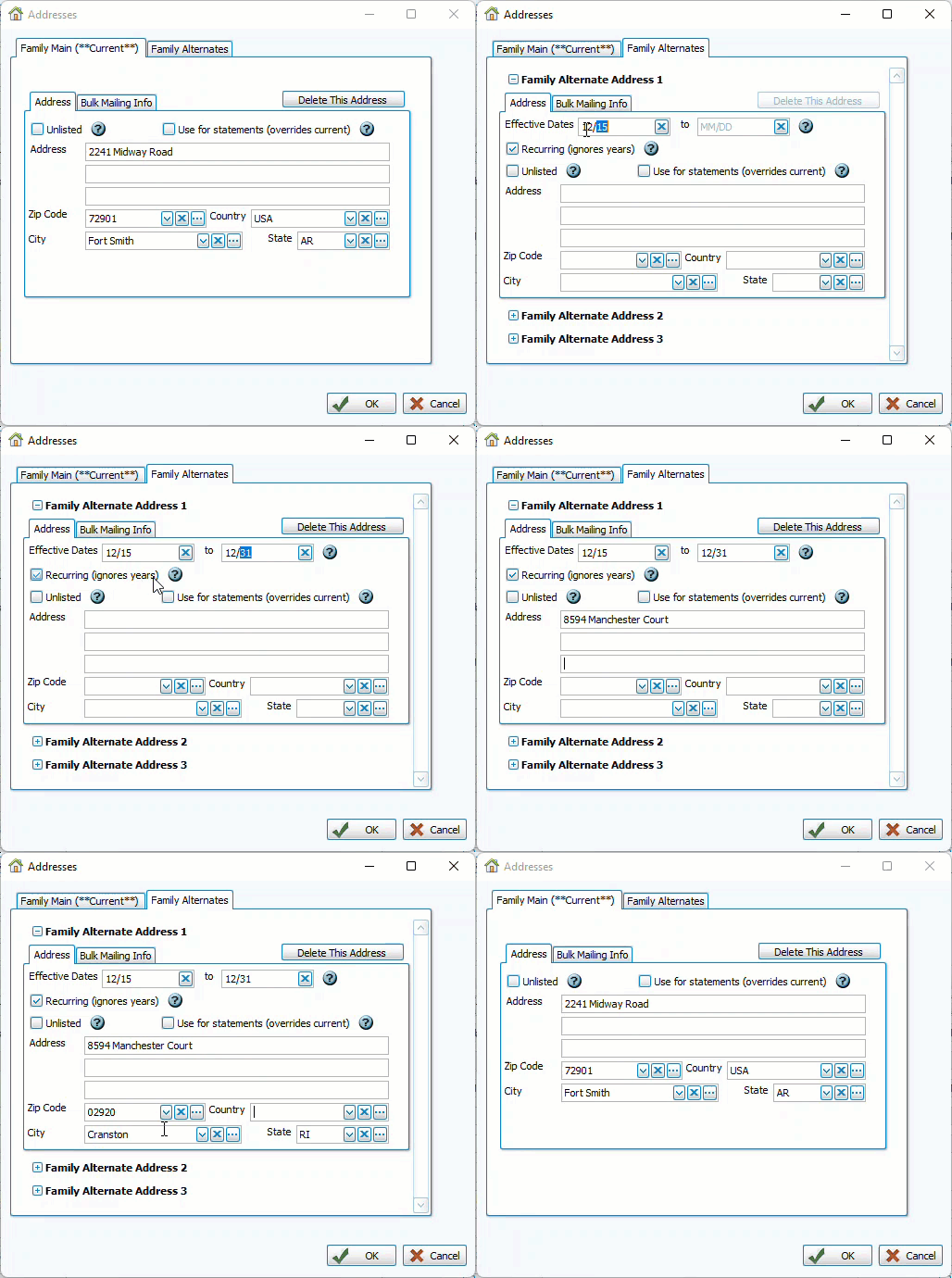
-
From the family record, click edit
 next to the address drop down to open Addresses.
 -
Click the Family Alternates tab.
-
Enter Effective Dates if there are dates when this address should generate for reports or labels.
-
If those dates cycle annually, check the Recurring check box. Uncheck to add years to Effective Dates.
-
Enter the address information and click
 .
.
Add an Alternate Individual Address
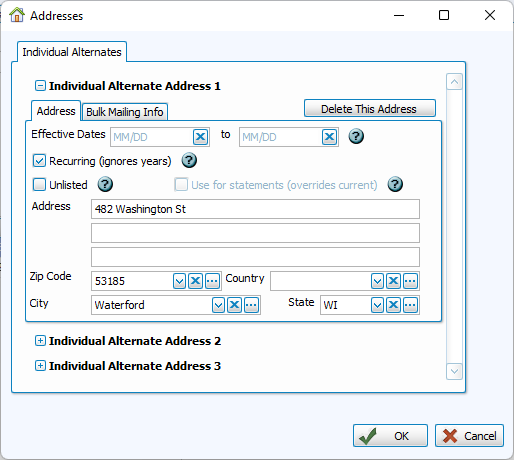
-
From the individual record, click the Addresses/Phones/Email tab.
-
Click the
 next to the Addresses drop down.
 -
Enter Effective Dates if there are dates when this address should be generate for reports or labels.
-
If those dates cycle annually, check the Recurring check box. Uncheck to add years to Effective Dates.
-
Enter the address information and click
.
Donation Statement Address
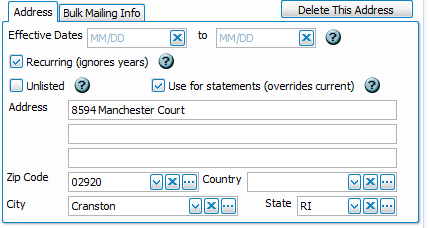
Records from Membership are made available in the Donations module, however, contact information is still edited from the Membership module. You can designate an alternate address for statements from the edit screen by checking Use for Statements. This will override the current address and will be noted in the address drop-down list.

The statement address will be shown on the Address tab in Manage Givers.
Unlisted Information
Phone numbers, addresses, and emails have options to indicate a piece of contact information as Primary or as Unlisted.
By default, the primary phone number will be the family phone number. Check the Primary box next to another number make it the main number.
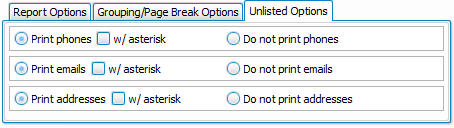
Unlisted contact information will not be included in Directory layouts. On other reports, you have the option of either printing these contact pieces, excluding unlisted information, or printing it with an asterisk.
Cell Phone Numbers
Cell phone numbers are entered in an individual record. To include these in Directories, you'll need to include that field with your template and point it to the corresponding Membership information.
Choose a layout or template and click Edit.
On the right, under Data Controls, click and drag Membership Field to the location where the number should print and select the cell phone field under Personal Information Fields. Often, layouts that include cell phone use a Personalized Label to denote these numbers and distinguish the cell phones of spouses.
Mass Edit Area Codes
When a city expands on available area codes, you can use the Mass Edit function in the Find Grid to change area codes for many numbers at once.
Submit your Query to pull up the records in the Grid. Click Mass Edit and select the phone number field in the top drop down. Choose the option for "Select records where Phone:" and key in the old area code. Enter the new area code in the "Replace with" box to replace that area code.